ERR_CACHE_MISS and “Confirm Form Resubmission”: why Back breaks after a form, and the fix
Test record
- Tested on
- A separate test nginx on our DigitalOcean droplet (Ubuntu 24.04) with PHP-FPM, and Chrome on a MacBook
- Versions
- Chrome 155.0.8059.85 on macOS 27.0.1, nginx 1.24.0, PHP 8.3.6-FPM, WordPress 7.1.3 (for its headers)
Short answer
Chrome shows ERR_CACHE_MISS ("Confirm Form Resubmission") when you go Back to a page made by a form you sent, and the site told Chrome not to keep a copy. That happens with Cache-Control: no-store, which PHP sessions and WordPress login pages send. As a visitor, don't press Reload if the form placed an order or sent a message, because it will be sent again; open the page from a link instead. As a site owner, redirect after every form (a 303 to a thank-you page) and Back works.
On this page
You filled in a form, moved on to another page, pressed Back, and Chrome showed Confirm Form Resubmission with the code ERR_CACHE_MISS. Nothing is broken on your computer. The site told Chrome not to keep a copy of that page, so Chrome has nothing to show without sending your form again. We set up six versions of the same form on our own server to find out exactly what causes it, and one small change on the site that makes it go away.
What you’ll see
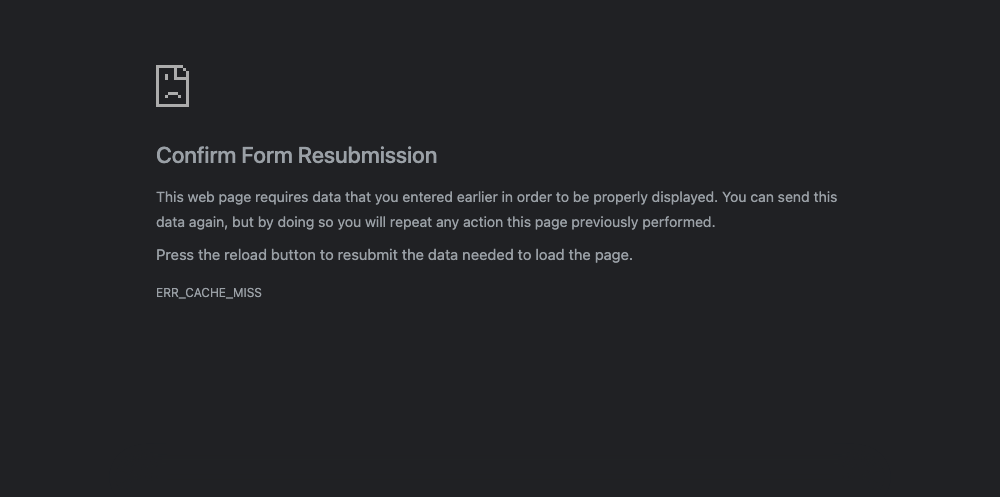
A grey Chrome page titled Confirm Form Resubmission. It says the page “requires data that you entered earlier”, that pressing reload will send it again, and it shows the code ERR_CACHE_MISS.
What it means
The page you’re going back to was made by a form you sent (a POST request). Chrome keeps most pages you’ve visited in memory, so Back is instant. It never keeps form results there, though. Its own log gave the reason “HTTPMethodNotGET”. So to show the page again, Chrome looks for a saved copy in its normal cache.
If the site sent the header Cache-Control: no-store, which means “don’t save this anywhere”, there’s no copy. Chrome’s name for that is ERR_CACHE_MISS, which its source code describes as “the cache does not have the requested entry”. Chrome won’t quietly send your form again, because that could repeat an order or a payment. So it stops and asks.
How we reproduced it
Rahul ran these tests on 22 October 2026. He built a test form with six different result pages on a separate nginx 1.24 server on our DigitalOcean droplet, with PHP 8.3. In Chrome 155 on his Mac, he sent the form, opened another page, pressed Back, then pressed Reload. Each result page counted the orders it received, so we could see when a form was sent twice.
Back showed ERR_CACHE_MISS when the result page:
- sent
Cache-Control: no-store; - called PHP’s
session_start(), which addsno-storeon its own (PHP’s default “nocache” setting); - sent WordPress’s no-cache headers. These are the ones WordPress 7.1.3 uses on its login page and admin screens.
Back worked when the result page:
- sent no cache headers at all (Chrome showed its saved copy);
- sent
Cache-Control: no-cache(Chrome still kept a copy and showed it); - wasn’t a form result at all, because the form redirected to a separate thank-you page (more on this below).
Reload sent the form again on every form result page, including the one behind the ERR_CACHE_MISS prompt. Our order counter went up by one each time. Only the redirect version was safe to reload: the count stayed the same.
With the redirect, Back was instant. Chrome restored the thank-you page from memory without asking the server.
Which fix applies to you
- If you’re visiting a site, you can’t stop the prompt, but you can avoid sending something twice. See If you’re a visitor.
- If it’s your site and people hit this after a form, one redirect fixes it. See Fixes for site owners.
If you’re a visitor
1. Don’t press Reload if the form did something
If the form placed an order, made a payment, booked something or sent a message, reloading may do it again. In our test, every reload added another order. To check that the first one went through, look for a confirmation email or check your account on the site.
2. Open the page fresh instead
Click a link to the page, or type its address into the address bar. That loads it the normal way, without your form data, so nothing is sent twice.
3. Reload only if the form was harmless
For a search box or a filter, sending it again does no harm. Reload is fine there.
Fixes for site owners
1. Find out what your form sends back
Send a test submission and look only at the response headers. Use a test form or a staging copy, because this really submits the form:
curl -s -D - -o /dev/null -d "test=1" https://example.com/your-form-handler/ | grep -iE "^(HTTP|cache-control|location)"These are the answers our test pages gave. The first will cause ERR_CACHE_MISS on Back. The second is the fix:
HTTP/1.1 200 OK
Cache-Control: no-store, no-cache, must-revalidate

HTTP/1.1 303 See Other
Location: thanks.php
2. Redirect after every form
Handle the form, then send the visitor to a normal thank-you page with a 303 redirect. Developers call this “Post/Redirect/Get”. The HTTP standard (RFC 9110) describes 303 as the code for exactly this: sending the browser from a POST to a separate page it can load normally. In plain PHP:
// after saving the form data
header( 'Location: /thanks/', true, 303 );
exit;
In WordPress, use wp_safe_redirect(). Its default status is 302, so pass 303, and remember the exit, which WordPress doesn’t add for you:
wp_safe_redirect( home_url( '/thanks/' ), 303 );
exit;
If a form plugin shows its thank-you message on the same page it posted to, look in its settings for something like “redirect to a page after submission”.
3. Don’t remove no-store from private pages to hide the prompt
WordPress sends no-store on its login page on purpose, so that a shared computer doesn’t keep a copy of private pages. Removing it would make Back work, but at the cost of privacy. Redirect instead.
For form results that aren’t private, Cache-Control: no-cache is the gentler choice. It tells browsers to check with the server before reusing a page, but still lets Chrome keep a copy for Back. Back worked with it in our test, and Google’s web.dev guide recommends no-cache over no-store for pages that aren’t sensitive.
4. Check for sessions you don’t need
Any PHP page that calls session_start() sends no-store unless it’s told otherwise. If a theme or plugin starts a session on every page, all its form results will trigger this prompt. Look for session_start in custom code. If the page doesn’t need a session, don’t start one.
Check it’s fixed
- The curl command from step 1 shows
303 See Otherand aLocationline. - In Chrome, send the form, open another page and press Back. You see the thank-you page, with no prompt.
- Press Reload on the thank-you page. No second submission arrives.
Undo
Remove the redirect lines and the form shows its result on the same page again. Keep a copy of the file before you edit it.
What didn’t work
Turning off Chrome’s back/forward cache. We ran every case with it on and with it off, and got the same results. Chrome never keeps form results there, and its own log said so: the page wasn’t loaded with a normal GET request.
The older version of this guide suggested clearing Chrome’s history, checking extensions, resetting or updating Chrome, ticking “Disable cache” in Developer Tools, and resetting network settings. We didn’t re-run those, and removed them. The prompt comes from the site’s headers and from how Chrome protects form data, and none of those steps changes either.
Related errors
ERR_EMPTY_RESPONSEmeans the server sent nothing back at all. See our ERR_EMPTY_RESPONSE guide.DNS_PROBE_FINISHED_NXDOMAINmeans Chrome couldn’t find the site’s address. See our NXDOMAIN guide.
Sources
- Chromium source: net_error_list.h (CACHE_MISS, “The cache does not have the requested entry”) and error_page_strings.grdp (the resubmission warning text)
- RFC 9110, section 15.4.4: 303 See Other, used after a POST
- PHP manual: session_cache_limiter (the default “nocache” headers)
- WordPress developer docs: wp_safe_redirect() (default 302, needs exit) and wp_get_nocache_headers()
- web.dev: back/forward cache (no-store pages, and no-cache as the alternative for pages that aren’t sensitive)
- Our test log from 22 October 2026 (every step, Chrome’s network and back/forward-cache events, and the order counter), kept with this guide
Changelog
22 Oct 2026: rewritten from scratch after testing on Chrome 155, nginx 1.24 and PHP 8.3. It now explains the cause and gives the fix for site owners. Removed the 2018 advice (clearing history, resetting Chrome, network resets), because none of it changes what causes the prompt. First published 26 Feb 2018.