Chrome extensions for web developers: the 7 we kept after testing 12
Test record
- Tested on
- Chrome 156 on a MacBook, a fresh profile for each extension, pages from a staging copy of this site
- Versions
- Chrome 156.0.8078.48. Redirect Path 4.0.0, Web Developer 3.0.1, WhatFont 3.3.0, META SEO inspector 3.11.3, ColorZilla 4.1, Wappalyzer 6.12.7, JSON Formatter 0.10.2
Short answer
Redirect Path, Web Developer, WhatFont, META SEO inspector and ColorZilla did their jobs on our WordPress site and contacted little or nothing outside it. Wappalyzer and JSON Formatter work too, but they read every page you open, and Wappalyzer talked to its own servers, Stripe and Google Tag Manager. Remove ModHeader if you still have it: Google pulled it from the Chrome Web Store in July 2026.
On this page
The Chrome extensions for web developers we’d install in 2026 are Redirect Path, Web Developer, WhatFont, META SEO inspector and ColorZilla. Wappalyzer and JSON Formatter make the list too, if you’re comfortable with what they can see. We tried 12 extensions one at a time in a clean copy of Chrome 156, used each on our own WordPress site, and logged every outside server it contacted. If you still have ModHeader, remove it: Google pulled it from the Chrome Web Store in July 2026.
How we tested: Rahul ran every test on 23 October 2026, in Chrome 156.0.8078.48 on a MacBook. Each extension went into its own fresh, empty browser profile, installed from Google’s update server, which hands out the same files as the Chrome Web Store. Then it was used on pages from a staging copy of this site. We recorded whether its main feature worked, what its manifest lets it read, which outside servers it talked to while we used it, and any pages it opened by itself. The users, ratings and update dates come from the Chrome Web Store on the same day.
What we judged them on
An extension had to do its job on a real WordPress page, and it had to be updated recently enough that it still works with the Manifest V3 rules Chrome now enforces. Then came the part most lists skip. An extension that reads “all your data on all websites” also sees your logged-in WordPress dashboard and your hosting panel, so we looked hard at how much each one asks for and who it talks to.
These are the outside servers each of the seven contacted while we used it. Requests to our own site and to Google’s update server aren’t counted.
| Extension | Outside servers it contacted |
|---|---|
| Redirect Path | None |
| Web Developer | None |
| WhatFont | None |
| META SEO inspector | Google’s site-icon service and Gravatar |
| ColorZilla | None |
| Wappalyzer | wappalyzer.com, Stripe and Google Tag Manager |
| JSON Formatter | None |
Web Developer, ColorZilla and Wappalyzer also opened a welcome page on their maker’s website straight after installing. That’s normal, but it’s worth knowing they do it.
The seven Chrome extensions we kept
1. Redirect Path: see every redirect a page goes through
Redirect Path shows each hop a URL takes before the page loads, with its status code. We opened the address of a post we’ve retired, and it showed the 301 to our homepage and then the final 200, which is exactly how we set it up. When you’re chasing a redirect loop or a 301 that should have been a 302, this saves opening DevTools at all.
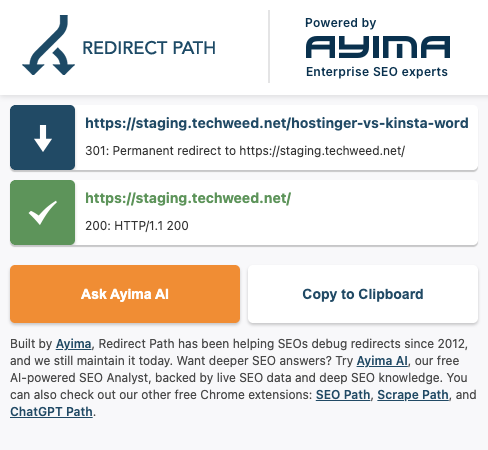
It can watch requests on every site, because that’s how it sees redirects, but it contacted nothing outside our site in our test. The panel now advertises “Ask Ayima AI”, the maker’s own tool, and you can ignore it. Version 4.0.0, updated 14 May 2026, 300,000 users.
2. Web Developer: one menu for headers, cookies, CSS and forms
Chris Pederick’s Web Developer has been around since the Firefox days, and it’s still the quickest way to switch off CSS or JavaScript, outline elements, or read a page’s response headers. On our article, Information then View Response Headers opened a page listing the headers our server sent, including the security headers we’d set in nginx.
It asks for a lot (cookies, history, browsing data and every site), because each menu item needs one of those. In our test it contacted nothing outside our site. The last update was 29 June 2024, which is old, but it ran fine in Chrome 156. Version 3.0.1, 1,000,000 users.
3. WhatFont: name any font on the page
Click WhatFont, then click any text. On our headline it named Bricolage Grotesque as a web font and gave the size (64px), weight (800), line height and colour (#15181E), with a button that copies the CSS. That’s quicker than digging through computed styles in DevTools.
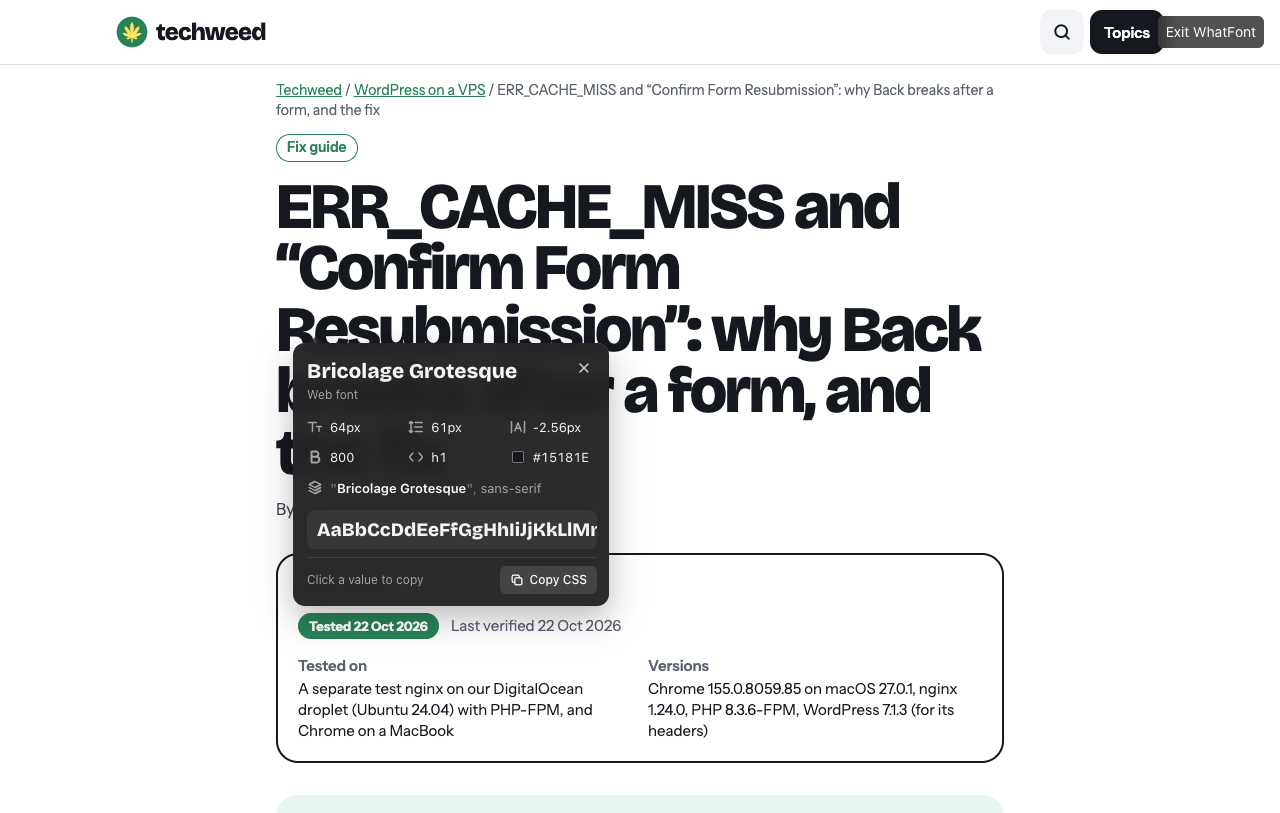
WhatFont is also the most careful of the seven. It only touches a page when you click it, and it asks for no access to sites in advance. It contacted nothing in our test. Version 3.3.0, updated 12 October 2026, 3,000,000 users.
4. META SEO inspector: catch a missing canonical before launch
META SEO inspector lists a page’s title, description, canonical, robots and structured data, and marks problems in red. On our staging copy it warned that the article had no canonical tag. Staging is set to noindex, and Rank Math leaves the canonical off noindex pages, so the warning was right and the setup was intended. It’s the kind of thing you want flagged before a launch.
It runs on every page you open. When we opened its panel, it fetched site icons from Google and an image from Gravatar. Version 3.11.3, updated 14 October 2026, 200,000 users.
5. ColorZilla: pick colours and list a page’s palette
ColorZilla’s menu has seven tools, from an eyedropper to a gradient generator. For checking a site, the useful one is the Webpage Colour Analyzer, which lists every colour a page’s CSS uses. On our article it found 15. Our brand green (#288257), our highlight yellow (#FFE45C) and our text colour (#15181E) were among them, matching the design file exactly.
It can reach every site, but it only runs when you use it, and it contacted nothing in our test. Version 4.1, updated 22 May 2024, 4,000,000 users and a 4.7 rating, the highest of the seven.
6. Wappalyzer: what a site is built with
Wappalyzer identifies the software behind a site. On ours it found WordPress, MySQL, nginx and PHP, the Oxygen builder (and Breakdance, which Oxygen is built on), Rank Math, Google AdSense, Ahrefs and WordPress’s emoji script. The emoji one is a fair catch, since we don’t need that script.
The cost is privacy. It runs on every page, can read cookies and watch requests, and in our test it talked to wappalyzer.com, Stripe and Google Tag Manager. It also opened a welcome page with tracking tags in the address. Install it if you look up sites often, and set it to run only when you select it (see the last section). Version 6.12.7, updated 29 September 2026, 3,000,000 users.
7. JSON Formatter: readable API responses, with a caveat
JSON Formatter turns raw JSON into a tree you can fold, with a Raw and Parsed switch. We opened our own WordPress REST API, and it formatted the post data at once. In our test it contacted nothing, and the only outside addresses in its code are Google’s update server and GitHub.
The caveat is its history this year. Its rating has fallen to 1.5 stars, and reports from 2026 say the developer stopped publishing the source and that a version showed donation pop-ups on shop checkout pages. We didn’t see that in version 0.10.2 (updated 16 May 2026), but it runs on every page you open. If that bothers you, Chrome’s DevTools can show the same response formatted: open the Network tab, click the request and choose Preview.
Remove ModHeader if you still have it
ModHeader, a popular way to set request headers, is gone from the Chrome Web Store. Google removed it on 10 July 2026, after Stripe’s security team found code in version 7.0.18 that could collect the sites you visit. The code was switched off and nobody has shown it sent anything, but an update could have turned it on. Removing it from the store doesn’t remove it from your browser. Uninstall it, and change any API keys or tokens you ever typed into its headers.
We couldn’t test it, because it’s no longer available to install.
Weeding out the 2018 list
The first version of this page, from February 2018, recommended six extensions. Only one of them made it onto this list.
- CSSViewer and Lorem Ipsum Generator are no longer in the Chrome Web Store, so their old links lead nowhere.
- Usersnap now needs an account before it does anything. It’s a feedback tool for teams, and its toolbar button only asks you to log in.
- Window Resizer still works, but Chrome’s device toolbar does the same job. Open DevTools and press Cmd+Shift+M on a Mac or Ctrl+Shift+M on Windows. The extension also opened its maker’s welcome page over plain HTTP.
- ColorPick Eyedropper gave way to ColorZilla. ColorPick runs a script on every page you open, its code includes its maker’s order pages, and it rates 3.9 against ColorZilla’s 4.7.
- Web Developer stayed, because it’s still the most useful of the six.
Two we checked but didn’t add
axe DevTools is a respected accessibility checker, but its scan lives in a DevTools panel our test setup couldn’t drive, so we can’t vouch for it first-hand. On install it opened Deque’s website and contacted Amplitude, an analytics service. The axe-core engine it uses also runs free from the command line.
Cookie-Editor handles permissions well. It asks for access to a site only when you open it there. Its panel also showed an advert, though, and its code carries affiliate links for a VPN and other products. Web Developer’s Cookies menu covers the basics without either.
How to check an extension before you trust it
Go to chrome://extensions and click Details on each one. Next to “Allow this extension to read and change all your data on websites you visit”, choose “On select” for anything you don’t need on every page, so it only runs when you press its button. Check the permissions it lists, and the “Updated” date on its Chrome Web Store page. Remove anything you haven’t used in a month. Fewer extensions with less access means fewer surprises like ModHeader.
Sources
- Chrome Web Store listings for each extension (users, rating, version and update date), read on 23 October 2026
- The Hacker News on Google and Microsoft pulling ModHeader (July 2026)
- Reports on JSON Formatter’s 2026 changes: DEV Community and Feedbagel, which disagree on some details
- Google’s help page on managing Chrome extensions, including site access
- Our test log from 23 October 2026 (each extension’s manifest, the servers it contacted, and screenshots), kept with this guide
Changelog
23 Oct 2026: rewritten after testing 12 extensions on our own site. It replaces the six-extension list first published on 25 February 2018, and two of those six have since left the Chrome Web Store.